Outbound Webhooks
Copy page
Receive real-time HTTP notifications when conversations, feedback, or custom events occur in your project
Outbound webhooks send HTTP POST requests to your server when events happen in your project — new conversations, conversation updates, feedback submissions, and custom events. Use them to sync data with external systems, trigger downstream workflows, or build real-time integrations.
Outbound webhooks push data from Inkeep to your server. For the reverse — external services triggering your agents — see Webhook Triggers.
Create a webhook
Navigate to your project and select Outbound Webhooks in the left sidebar.
Click New Webhook.
Configure the destination
Fill in the required fields:
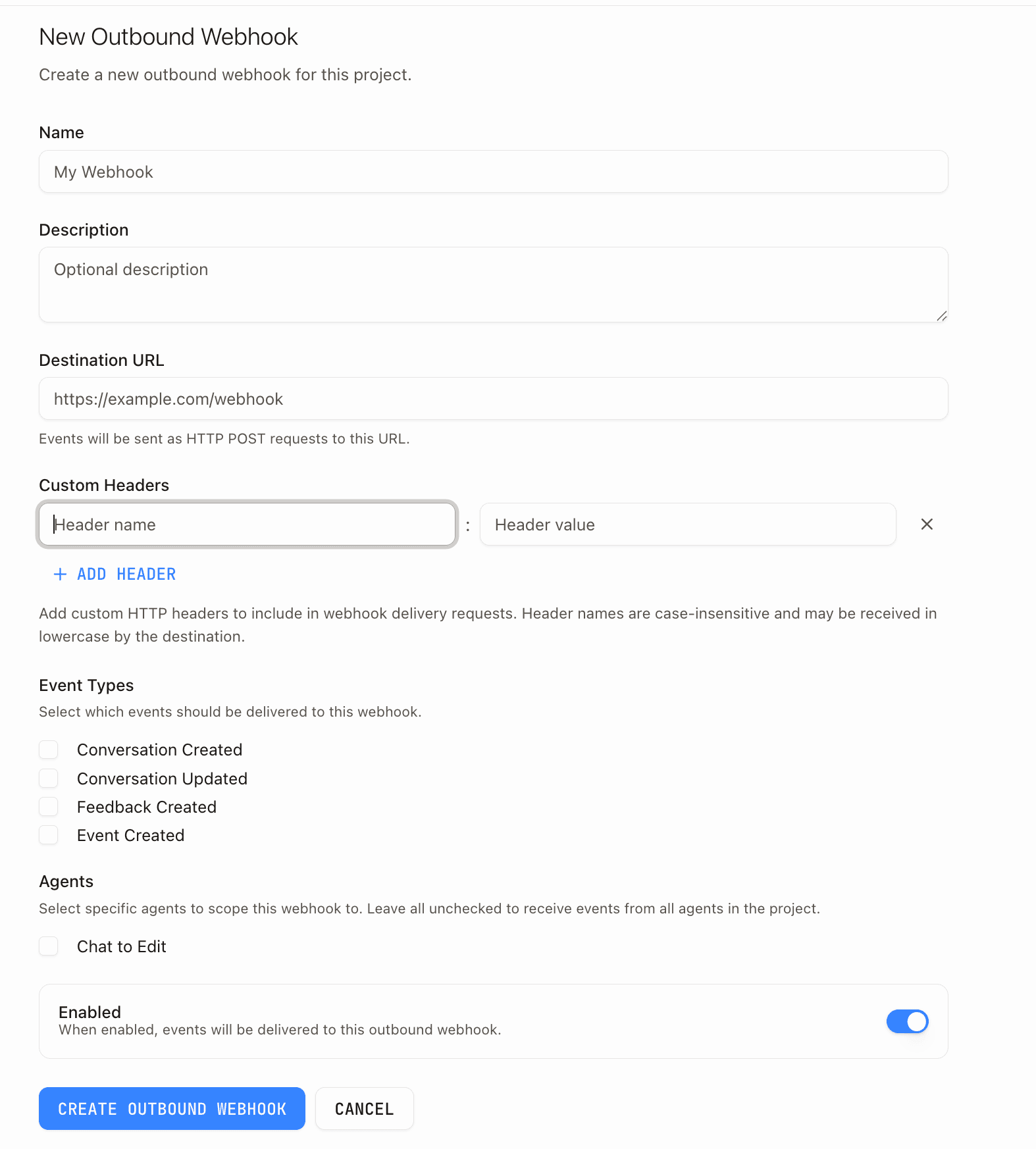
| Field | Required | Description |
|---|---|---|
| Name | Yes | Human-readable identifier (e.g., "Slack Notifications" or "CRM Sync") |
| Destination URL | Yes | The HTTPS endpoint that receives webhook POST requests |
| Event Types | Yes | Which events trigger delivery (select at least one) |
| Description | No | Explains what this webhook does |
| Custom Headers | No | Additional HTTP headers sent with every delivery |
| Agents | No | Scope to specific agents. Leave empty to receive events from all agents in the project |
| Enabled | — | Toggle on to activate immediately |
Test the destination
After creating the destination, use the Test action to send a sample payload to your URL. The test request uses a test event type with synthetic data and a 10-second timeout, so you can verify your endpoint is reachable before real events fire.
Event types
Each webhook destination subscribes to one or more event types. Your endpoint receives every event that matches the selected types and agent scope.
| Event type | Fires when |
|---|---|
conversation.created | A new conversation starts |
conversation.updated | A user sends a message or the assistant replies |
feedback.created | A user submits feedback on a conversation |
event.created | A custom event is logged via POST /run/v1/events |
evaluation.failed | An evaluation result does not meet its pass criteria |
conversation.execution.error | Conversation reaches terminal failure |
conversation.generation.error | An LLM call fails to produce a response |
conversation.tool.error | A tool call fails. For MCP tools, only fires when all calls to the server fail in a generation |
conversation.context.error | Context resolution encounters fetch failures |
Agent scoping
When you select specific agents on a webhook destination, only events originating from those agents trigger delivery. Leave the agents field empty to receive events from every agent in the project.
Evaluator scoping
For evaluation.failed events, you can further scope a webhook destination to specific evaluators. When evaluators are selected, only failures from those evaluators trigger delivery. Leave the evaluators field empty to receive evaluation.failed events from all evaluators in the project.
Payload format
Every delivery is an HTTP POST with Content-Type: application/json. The body follows a consistent envelope:
Conversation events
conversation.created and conversation.updated both deliver a conversation object inside data:
Feedback events
feedback.created delivers both the feedback and the associated conversation:
Evaluation events
evaluation.failed fires when an evaluation result does not meet its pass criteria. The payload includes the evaluator name, the conversation ID, and the specific conditions that failed:
Custom events
event.created delivers the persisted event object:
Slack integration
Webhook destinations pointing to Slack automatically receive rich formatted messages instead of raw JSON. This applies whether the URL was added via the OAuth flow or typed manually.
Connect a Slack channel
On the Outbound Webhooks page, click Connect Slack Channel. This starts a Slack OAuth flow that lets you pick a channel and grants an incoming-webhook URL.
After authorizing, you're redirected back to the webhook creation form with the Slack URL pre-filled. Select your event types and click Create.
Slack payload format
The text field serves as the notification preview (mobile push, channel sidebar). The blocks array renders the rich card in the channel. Non-Slack URLs always receive the standard JSON envelope without text or blocks.
Delivery and retries
Inkeep delivers each event to each matching destination independently with automatic retries.
| Behavior | Detail |
|---|---|
| Method | POST |
| Timeout | 30 seconds per attempt |
| Max attempts | 3 |
| Retry backoff | Exponential: 2s, 4s |
Custom headers
Webhook deliveries include any custom headers you configure on the destination.
The following reserved headers cannot be used as custom headers: Connection, Keep-Alive, TE, Trailer, Transfer-Encoding, Upgrade, Proxy-Authorization, Proxy-Connection, Content-Length.
Manage webhook destinations
The webhook destinations page shows all configured destinations with their name, URL, enabled status, and subscribed event types.
| Action | Description |
|---|---|
| Edit | Update the name, URL, events, headers, agent scope, or enabled status |
| Test | Send a sample payload to verify the destination is reachable |
| Delete | Permanently remove the destination |
Toggle the Enabled switch to pause or resume delivery without deleting the destination.
Conversation error events
Subscribe to error events to get notified when agent conversations encounter failures. Four error event types are available:
| Event type | Fires when |
|---|---|
conversation.execution.error | Conversation reaches terminal failure (max consecutive errors, max transfers exhausted, or uncaught exception) |
conversation.generation.error | An LLM call fails to produce a response |
conversation.tool.error | A tool call fails. For MCP tools, only fires when all calls to the server fail in a generation |
conversation.context.error | Context resolution encounters fetch failures |
Subscribing
In the webhook destination form, use the Conversation error checkbox to subscribe to all four error types at once. Click Advanced to select specific error types individually.
Each error event type is independently subscribable via the eventTypes array — subscribe only to the types you care about.
Example payloads
conversation.execution.error
conversation.generation.error
conversation.tool.error
For MCP tools, this event only fires when all calls to the same server fail during a generation. If at least one call to the server succeeds, the failures are treated as warnings and no webhook is sent.
conversation.context.error